Resources · Technical
Google AI Overviews: a website owner's guide
6 min read · updated October 28, 2026

Google AI Overviews are automatically produced summaries shown in Search, and they may include links to pages that support the answer. If you manage a site, begin by confirming access and eligibility. After that, evaluate which information the page contributes and what the available reports can reveal.
This guide is about organic visibility. It does not cover purchasing ads in AI results, and it does not claim that any eligible page will necessarily be chosen. Google’s documentation and controls were reviewed on 9 September 2026.
How do AI Overviews differ from AI Mode?
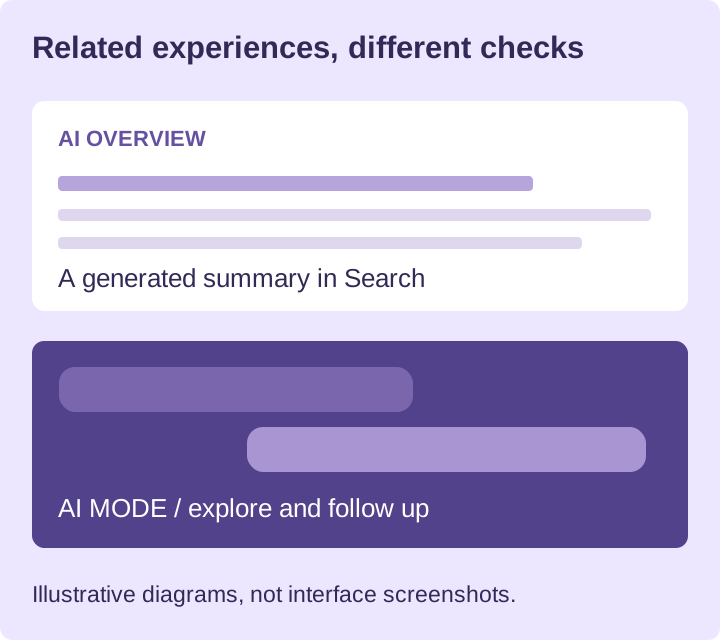
AI Overviews deliver a generated reply inside the search experience when Google’s systems determine it is helpful. AI Mode is designed for deeper investigation and follow-up questions. The two can rely on different methods and surface different supporting links. Google’s explanation of AI features lays out those differences.
In January 2026, Google also announced a transition from an Overview into a follow-up conversation in AI Mode. Think of the two surfaces as connected, but note the conditions for any visibility check in your records. A saved AI Mode response is not proof that the same link appeared in an Overview.
How do Google AI Overviews work?
An AI Overview is a summary Google generates for some searches, with links to the pages that support it. Google’s systems decide when one is helpful, and the linked pages come from the Search index, so a page Google has not indexed cannot be one of them.
Google says it pulls relevant information from its Search index and may also run related searches to cover parts of a query. This is commonly known as query fan-out. That does not imply a publisher must build a separate page for every possible variation. Google’s optimization guide specifically cautions against creating large volumes of pages mainly to influence these responses.
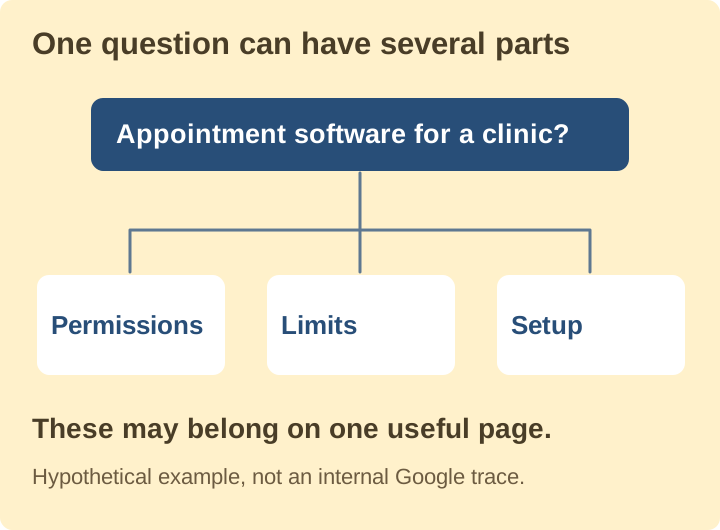
Take a hypothetical search about selecting appointment software for a clinic. Follow-up questions could involve permissions, scheduling restrictions, or setup. When those topics belong together, they can be answered together on one useful product page. This is only an illustration of the idea; it is not a record of Google’s internal searches.
If the content you already have is too general, fill in the missing details. Writing ten near-identical versions of the same answer adds upkeep without giving readers ten genuinely useful resources.
How to get into Google AI Overviews
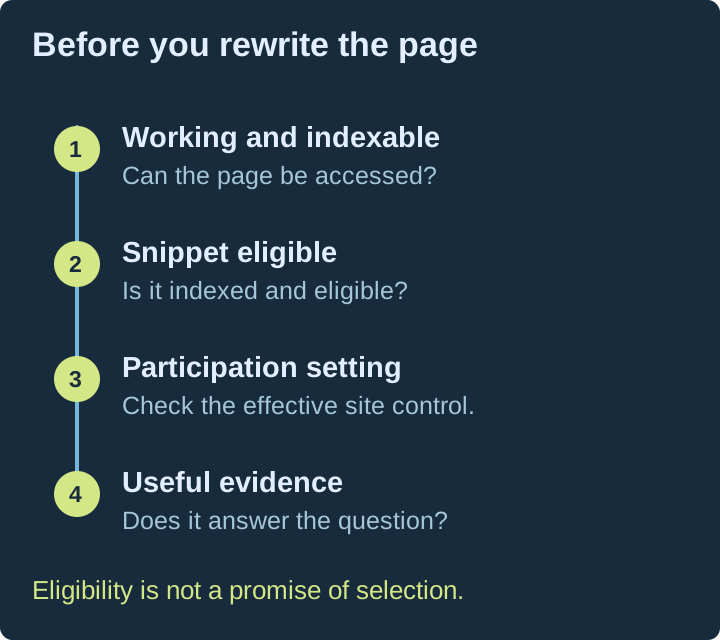
There is no form to apply and no markup that opts a page in. A page can appear as a supporting link when three things are true: Google has indexed it, it is eligible for a snippet in Search, and the Search generative AI control in Search Console does not exclude it. Meeting all three makes a page eligible; it does not mean Google will pick it. Check them in this order.
Start with the page itself. Google’s Search technical requirements address crawler access, a valid response, and content that can be indexed. For a supporting AI link, the page must also be indexed and qualify for a Search snippet, according to the AI features documentation.
After that, verify participation. Search Console now includes a Search generative AI control in Settings. Google’s control documentation explains inclusion, exclusion, and inheritance from a parent property. Before you investigate an unexplained omission, check both the effective setting and the property you are looking at.
Finally, inspect what the page actually says. Eligibility only makes a page eligible for consideration; it does not show that the answer is useful or that Google will choose it. Our page-priority guide can help decide what to improve once access is clear.
Keep participation and training controls separate
The Search generative AI control determines participation in the Search features listed with it. Google says it is not a ranking or inclusion signal for other parts of Search, and it does not govern AI training. Its documentation points site owners to Google-Extended for the training decision. Read the scope of the control before making any changes.
Before selecting a control, identify the business question you are trying to answer. A desire to restrict model training does not automatically mean you want to vanish from organic Search. Inherited property settings may also change which option is currently in effect.
Before changing access or participation, document the intended result and obtain approval from the responsible site owner. This article does not ask you to change settings. An inspection may show that the present configuration already matches the business’s decision.
What should you improve on the page?
Google’s Search Central advice for AI experiences highlights helpful original content, accessible pages, and a strong experience across devices. Pick one specific reader problem to solve.
A comparison of services should include criteria and up-to-date facts. A how-to guide needs steps that actually work and a straightforward way to verify the result. A pricing explanation should include the constraints that influence cost. Keep supporting sources next to the claims they support.
Images and diagrams ought to clarify the answer. Use a real process, a relevant comparison, or a current interface. Put the same information into text as well, so the article still works when the image is unavailable. There is no need to animate a diagram when its meaning is clearer if it remains still.
For implementation specifics, see structured data for AI crawlers and checking whether AI can read your website. Neither should be treated as a guarantee of inclusion.
How to monitor Google AI Overviews
Use three sources, and keep them apart:
- Search Console, for impressions from AI features. The generative AI report is linked from the Performance report.
- Repeated checks of the questions your buyers ask. Save the date, location and device each time, with the pages Google linked and the competitors it named. Geofound runs these checks daily across Google AI Overviews and seven other AI engines.
- GA4, for the visits and enquiries that follow.
Google’s 2026 Search Console announcement added dedicated views for generative AI impressions in Search, with breakdowns by page, country, and device. Those impressions are still included in the overall reports. Use the dedicated view to assess visibility, and keep visits and business actions in the analytics reports where they belong.
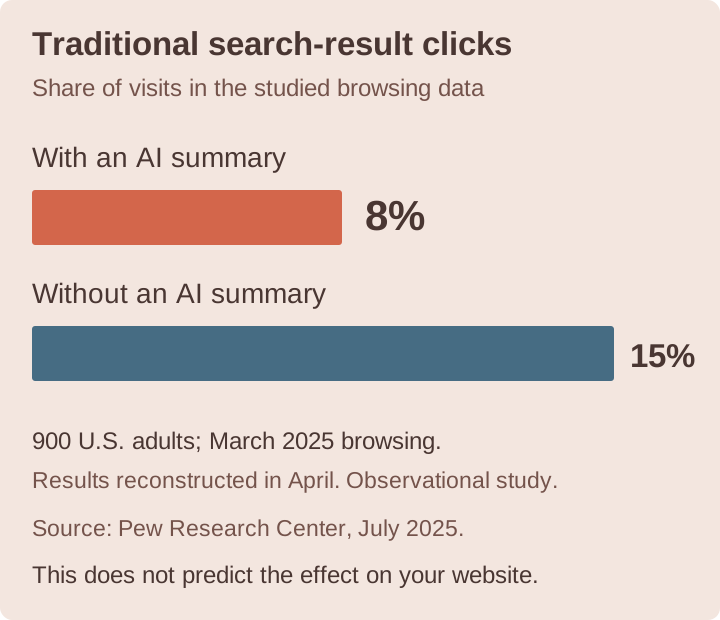
In Pew Research’s study of browsing by 900 U.S. adults in March 2025, traditional-result clicks occurred in 8% of visits with an AI summary and 15% without one. The researchers reconstructed the search results in April, so the summary classification reflects that later collection. The result describes the people and period studied; it does not forecast your site’s traffic or demonstrate that the summary alone caused the gap.
Our GA4 and Search Console measurement guide provides a practical reporting approach. Do not derive an AI conversion rate by dividing assistant-referred enquiries by Google AI impressions from a different population.
Common questions
Can I promise an AI Overview citation? No. Clearing technical checks does not ensure selection, and one successful observation does not mean the same outcome will recur.
Should I use one search as my benchmark? No. Preserve the conditions and results of repeated checks, then interpret them together with the available platform reports and business outcomes.
What should I do this week? Examine one page that matters commercially, verify its effective participation settings with the site owner, and correct one confirmed information gap. Note the observation date and review it again through a weekly GEO routine.
Check your brand's AI visibility as a separate starting point for examining how an assistant describes your business.
Citations (8)showhide
- Google's explanation of AI features
- announced a transition from an Overview into a follow-up conversation in AI Mode
- Google's optimization guide
- Search technical requirements
- control documentation
- Search Central advice for AI experiences
- 2026 Search Console announcement
- study of browsing by 900 U.S. adults in March 2025
See who AI recommends in your category
The free scan asks ChatGPT three of your buyers' questions and shows whether you're in the answer, in about a minute.
Run the free scan →Go further with daily AI tracking, SEO and competitor paid ads research, and recommendations to help you act. Explore the plans.